
Introduction
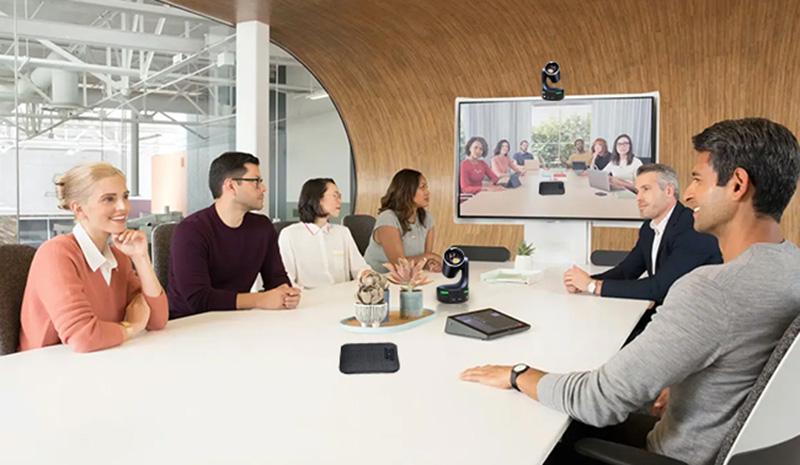
In today’s hybrid work environment, the quality of your virtual meetings directly impacts productivity, collaboration, and employee satisfaction. Whether your team is distributed across multiple time zones or working from different locations, having the right video conferencing equipment can transform your meeting experience from “just functional” to genuinely impactful.
Poly cameras have emerged as a game-changing solution for enterprises looking to elevate their virtual meeting capabilities. In this comprehensive guide, we’ll explore how Poly cameras can revolutionize your video conferencing setup and why leading organizations are making the switch.
The Virtual Meeting Challenge
Why Meeting Quality Matters
The shift to hybrid and remote work isn’t going away. According to recent studies, over 70% of knowledge workers now participate in video meetings at least three times per week. Yet, many organizations are still using outdated or inadequate video conferencing equipment that leads to:
- Poor video quality – Pixelated images, lag, and unclear video feeds
- Audio issues – Echo, background noise, and muffled conversations
- Camera limitations – Fixed framing that misses participants or shows irrelevant content
- Connectivity problems – Dropped connections and buffering
- Collaboration friction – Difficulty sharing content and engaging multiple participants
These challenges don’t just frustrate participants—they impact decision-making, relationship building, and overall business outcomes.
The Cost of Subpar Video Conferencing
When your virtual meetings struggle with technical issues:
- Productivity suffers – 30 minutes of troubleshooting is 30 minutes lost
- First impressions matter – Poor meeting quality reflects poorly on your organization
- Employee morale decreases – Frustration with technology breeds workplace dissatisfaction
- Opportunities are missed – Important details are lost in miscommunication
What Are Poly Cameras?
Understanding Poly’s Video Solution
Poly (formerly Polycom) is a leading provider of unified communications and collaboration technology. Poly cameras are professional-grade video conferencing cameras designed to deliver:
✅ Crystal-clear video quality – Up to 4K resolution for premium clarity
✅ Intelligent framing – Auto-zoom and speaker detection technology
✅ Superior audio – Built-in microphones and speakers with echo cancellation
✅ Seamless integration – Compatible with all major platforms (Zoom, Teams, Webex, Google Meet)
✅ Enterprise reliability – Built for mission-critical communications
Poly Camera Product Line
Poly offers a range of cameras to suit different organizational needs:
Studio Series:
- Poly Studio – Professional all-in-one camera for individual or small team spaces
- Poly Studio X30 – Premium 4K camera with intelligent framing
- Poly Studio X50 – Enterprise-grade with advanced speaker detection
TC Series:
- Poly TC10 – Compact camera for huddle rooms
- Poly Lens Camera – Portable solution for flexible workspaces
Specialty Solutions:
- Poly P Series – Purpose-built for specific environments
- Poly Eagle Eye Cube – Advanced room camera system
Key Benefits of Poly Cameras
1. Superior Video Quality
Poly cameras deliver professional-grade video quality that makes a difference:
- 4K Resolution – Crisp, clear images that show every detail
- Dynamic Range – Handles varying lighting conditions automatically
- Smart Zoom – Intelligent frame composition without distortion
- High Frame Rate – Smooth motion even during fast-paced discussions
Impact: Participants see and hear you clearly, improving communication effectiveness and reducing miscommunication.
2. Intelligent Framing Technology
One of Poly’s standout features is intelligent speaker detection and auto-framing:
Smart Features:
- Speaker Detection – Automatically frames the active speaker
- Dual-Screen Awareness – Detects and includes multiple participants in the frame
- Whiteboard Capture – Intelligently includes whiteboards and digital content
- Composition Optimization – Ensures optimal framing without manual adjustment
Real-World Example: During a team brainstorm, the Poly camera automatically adjusts to capture the person speaking, then expands the frame when multiple people contribute simultaneously. No one has to manually adjust the camera.
3. Professional Audio Quality
Clear audio is just as important as video:
- Built-in Microphones – High-sensitivity mics pick up speech clearly
- Dual Speakers – Rich audio output for immersive meetings
- Echo Cancellation – Advanced algorithms eliminate feedback
- Noise Reduction – Filters out background distractions
- Wide Audio Pickup – Captures voices from anywhere in the room
Impact: Participants no longer miss important details due to audio issues, reducing the need for “Can you repeat that?” moments.
4. Seamless Platform Integration
Poly cameras work with all major video conferencing platforms:
✓ Microsoft Teams
✓ Zoom
✓ Cisco Webex
✓ Google Meet
✓ Skype for Business
✓ RingCentral
✓ 8×8
✓ Jitsi Meet
No need to worry about compatibility—Poly cameras integrate smoothly with your existing infrastructure.
5. Enterprise-Grade Reliability
Built for mission-critical communications:
- 99.9% Uptime – Engineered for continuous availability
- Redundant Connections – Automatic failover capabilities
- Security Features – Encrypted video streams, secure authentication
- Remote Management – IT can manage and monitor cameras from anywhere
- Firmware Updates – Regular updates with no downtime
For IT Teams: Poly cameras integrate seamlessly with network monitoring tools and support remote diagnostics, reducing support tickets and minimizing downtime.
6. Cost-Effective at Scale
When deployed strategically, Poly cameras deliver strong ROI:
- Reduced Hardware Costs – One camera replaces multiple devices
- Lower Maintenance – Fewer technical issues and troubleshooting
- Productivity Gains – Fewer meeting delays from equipment problems
- Scalability – Easy to deploy across multiple locations
- Longevity – Durable equipment with long useful life
Cost Comparison: A quality Poly camera costs less than paying for even two hours of employee time spent troubleshooting poor video conferencing equipment.
Use Cases: Where Poly Cameras Shine
1. Executive Boardrooms
Challenge: Executive meetings require professional presentation and clear decision-making.
Poly Solution: 4K Poly cameras with intelligent framing ensure executives always present their best, facilitating better decision-making during critical meetings.
2. Hybrid Team Meetings
Challenge: Balancing in-person and remote participants requires careful camera placement and intelligent framing.
Poly Solution: Smart speaker detection automatically frames the active speaker, whether in the room or remote, creating an inclusive meeting experience.
3. Training and Webinars
Challenge: Delivering engaging training requires clear video and the ability to show presenters and content simultaneously.
Poly Solution: Intelligent framing captures both the presenter and presentation materials, keeping participants engaged.
4. Customer Meetings and Pitches
Challenge: First impressions are critical when meeting with customers or prospects.
Poly Solution: Professional 4K video quality presents your organization as modern, professional, and detail-oriented.
5. Huddle Rooms and Small Spaces
Challenge: Limited space requires flexible, high-performing equipment.
Poly Solution: Compact Poly cameras like the TC10 deliver professional performance in small footprints, ideal for huddle rooms and collaborative spaces.
6. Global Distributed Teams
Challenge: Time zones and distances can make team connection difficult.
Poly Solution: Crystal-clear video and audio help remote teams feel more connected and present, despite physical distance.
Technical Specifications: What Makes Poly Different
Video Specifications
| Feature | Poly Studio X30 | Industry Standard | Advantage |
|---|---|---|---|
| Resolution | 4K UHD (3840×2160) | 1080p | 4x sharper image |
| Frame Rate | 60 fps | 30 fps | Smoother motion |
| Field of View | 72° | 60° | More spatial coverage |
| Low Light Performance | Excellent (enhanced) | Fair | Works in various lighting |
| Auto-framing | Yes (speaker detection) | No | Hands-free optimization |
Audio Specifications
| Feature | Poly Studio X30 | Standard Webcam | Benefit |
|---|---|---|---|
| Microphones | Dual array (high-sensitivity) | Single mic | Captures from entire room |
| Speakers | Dual premium speakers | Single speaker | Full-range audio |
| Echo Cancellation | Advanced acoustic processing | Basic | Crystal-clear conversations |
| Noise Reduction | AI-powered | Minimal | Professional sound quality |
Implementation: Getting Started with Poly Cameras
Step 1: Assessment and Planning
Before deploying Poly cameras, assess your needs:
Questions to Ask:
- How many meeting spaces need video conferencing?
- What’s the typical meeting room size?
- How many participants usually attend meetings?
- What video conferencing platforms are you using?
- What’s your current meeting setup?
Step 2: Selecting the Right Camera
Choose based on your specific use case:
- Individual or Small Teams → Poly Studio
- Huddle Rooms → Poly TC10
- Conference Rooms → Poly Studio X30 or X50
- Large Board Rooms → Poly Studio X50 with advanced features
- Mobile/Flexible Spaces → Poly Lens Camera
Step 3: Installation and Setup
Best Practices:
- Mount camera at eye level for natural framing
- Position with good lighting (avoid backlighting)
- Test microphone and speaker placement
- Ensure network bandwidth (recommended: 3-5 Mbps for 4K)
- Configure for your video conferencing platform
Step 4: Integration with Existing Infrastructure
Integration Points:
- Connect to your existing video conferencing platform
- Integrate with room booking systems (optional)
- Enable remote management and monitoring
- Set up firmware update automation
Step 5: User Training and Adoption
Training Focus:
- Basic camera operation
- Optimal room setup
- Platform-specific features
- Troubleshooting common issues
Maximizing Your Investment
Tips for Getting the Most from Poly Cameras
1. Optimize Room Lighting
- Use natural light when possible
- Avoid backlighting (window behind speaker)
- Use professional lighting for boardrooms
- Minimize shadows on the speaker
2. Position Cameras Strategically
- Eye-level mounting creates natural framing
- Avoid extreme angles
- Consider sight lines for multiple participants
- Test framing before important meetings
3. Maintain Equipment
- Clean lenses regularly (monthly)
- Keep firmware updated
- Check cable connections periodically
- Monitor for software updates
4. Standardize Settings
- Configure consistent display brightness
- Set standard audio levels
- Create configuration templates for multiple rooms
- Document custom settings
5. Leverage Advanced Features
- Enable speaker detection for dynamic framing
- Use whiteboard capture when presenting
- Take advantage of picture-in-picture features
- Explore integration with room management systems
Real-World Impact: Success Stories
Case Study 1: Global Software Company
Challenge: Distributed team across 5 continents with poor video meeting quality affecting collaboration.
Solution: Deployed Poly Studio X30 cameras in all conference rooms and upgraded home office setups.
Results:
- ✅ 40% reduction in meeting-related support tickets
- ✅ 25% improvement in employee satisfaction scores
- ✅ Faster decision-making due to clearer communication
- ✅ Reduced need for follow-up meetings to clarify points
Case Study 2: Financial Services Firm
Challenge: Client meetings were suffering due to poor video quality, impacting business relationships and deal closures.
Solution: Implemented Poly cameras in all client-facing meeting spaces with professional lighting and setup.
Results:
- ✅ 35% improvement in client feedback scores
- ✅ Enhanced professional image
- ✅ Reduced meeting delays from technical issues
- ✅ Faster meeting scheduling due to improved reliability
Case Study 3: Healthcare Organization
Challenge: Telemedicine and virtual consultations needed professional-grade video for patient trust and care quality.
Solution: Deployed Poly Studio cameras in all telehealth consultation rooms.
Results:
- ✅ 50% increase in patient satisfaction scores
- ✅ Improved diagnosis accuracy through clearer visual assessment
- ✅ HIPAA-compliant secure video streaming
- ✅ Reduced no-shows due to professional experience
Comparison: Poly vs. Standard Webcams
Why Poly Cameras Stand Out
| Aspect | Poly Cameras | Standard Webcams | Winner |
|---|---|---|---|
| Video Quality | 4K, professional | 1080p, compressed | Poly |
| Audio Quality | Dual mics, echo cancellation | Single mic, limited | Poly |
| Intelligent Framing | Yes (speaker detection) | No (fixed) | Poly |
| Room Coverage | Full room visibility | Limited angle | Poly |
| Durability | Enterprise-grade | Consumer | Poly |
| Reliability | 99.9% uptime | Standard | Poly |
| Integration | All platforms | Basic support | Poly |
| Support | Enterprise support | Limited | Poly |
| Cost | Higher initial | Lower | Webcam |
| Long-term ROI | Excellent | Marginal | Poly |
Future of Video Conferencing
Emerging Trends
AI-Powered Features:
- Automatic meeting summaries
- Real-time translation
- Sentiment analysis
- Attendance tracking
Enhanced Integration:
- Seamless CRM integration
- Calendar-based auto-launch
- Contact center integration
- Advanced analytics
Immersive Technologies:
- 3D video conferencing
- Mixed reality integration
- Spatial audio
- Holographic presence
Poly is actively developing these features, ensuring your investment remains future-proof.
Getting Started with Poly at Your Organization
Implementation Roadmap
Phase 1: Pilot (Weeks 1-4)
- Deploy cameras in 2-3 key meeting spaces
- Gather feedback from users
- Document lessons learned
Phase 2: Expansion (Weeks 5-12)
- Deploy across additional locations
- Refine setup based on pilot learnings
- Conduct formal training
Phase 3: Optimization (Weeks 13+)
- Monitor performance and adoption
- Implement advanced features
- Plan for future expansion
Choosing the Right Partner
When implementing Poly cameras, you need a trusted partner who understands:
✅ Your business requirements
✅ Your existing IT infrastructure
✅ Your scalability needs
✅ Your budget and ROI requirements
✅ Integration with your current systems
At MetaPoint Technologies, we specialize in deploying professional video conferencing solutions for enterprises across South India. With over 15 years of experience and partnerships with leading vendors like Poly, we understand what it takes to transform your meeting experience.
Our team provides:
- Assessment and consulting – Understanding your specific needs
- Solution design – Creating the right configuration for your environment
- Professional installation – Expert setup and optimization
- Integration support – Seamless connection with your existing infrastructure
- Training and support – Ensuring successful adoption across your organization
- Ongoing management – Maintenance, updates, and optimization
Conclusion
Your virtual meetings deserve better. In a world where remote and hybrid work is here to stay, investing in professional video conferencing technology like Poly cameras isn’t a luxury—it’s essential.
Poly cameras deliver the video and audio quality, intelligent features, and reliability your organization needs to:
✅ Enhance communication clarity – Crystal-clear video and audio reduce miscommunication
✅ Improve participant engagement – Professional quality keeps participants focused
✅ Strengthen business relationships – Better meetings build stronger connections
✅ Increase productivity – Fewer technical issues mean more productive meetings
✅ Future-proof your infrastructure – Advanced features ensure longevity
Whether you’re looking to upgrade a single boardroom or implement a comprehensive video conferencing solution across your organization, Poly cameras deliver exceptional value.
Ready to Elevate Your Virtual Meetings?
Transform your video conferencing experience with professional Poly cameras.
Contact MetaPoint Technologies today for a free consultation:
📞 Phone: +91 99895 44438
📧 Email: satish@metapoint.in
🌐 Website: www.metapoint.in
Our experts will assess your current setup, understand your requirements, and design a solution that elevates your meetings while fitting your budget.
Let’s make your virtual meetings count. 🚀
About MetaPoint Technologies
MetaPoint Technologies is a leading IT infrastructure and collaboration solutions provider serving enterprises across Hyderabad, Bangalore, and South India. With 15+ years of experience and partnerships with leading vendors including Poly, Fortinet, Cisco, and HPE, we deliver comprehensive solutions that enhance business communication and security.
Our Services:
- Video Conferencing & Unified Communications
- Network Infrastructure & Security
- Cloud Solutions
- Data Centre Services
- Business Continuity & Disaster Recovery
Why Choose MetaPoint: ✓ 15+ years of proven expertise
✓ 100+ enterprise clients
✓ 35+ technology certifications
✓ 24/7 emergency support
✓ On-site and remote solutions
Additional Resources
Related Articles on Our Blog:
- “The Complete Guide to Unified Communications”
- “5 Tips for Optimizing Your Meeting Room Setup”
- “How to Choose Video Conferencing Equipment for Your Enterprise”
- “Remote Work Technology: Building the Perfect Home Office”
Industry Resources:
- Poly Official Website
- Unified Communications Trends Report 2026
- Video Conferencing Best Practices Guide
FAQ: Poly Cameras for Virtual Meetings
Q: What’s the difference between a Poly Studio and a Poly TC10?
A: The Studio series is designed for individual or small group spaces with premium 4K quality. The TC10 is a compact option for huddle rooms. The best choice depends on your room size and use case.
Q: Are Poly cameras compatible with Zoom and Teams?
A: Yes. Poly cameras work seamlessly with all major platforms including Zoom, Microsoft Teams, Cisco Webex, and Google Meet.
Q: What’s the typical ROI on a Poly camera investment?
A: Most organizations see ROI within 6-12 months through improved productivity, reduced support costs, and fewer meeting-related delays.
Q: Do we need special IT expertise to install Poly cameras?
A: While they can be installed in-house, professional installation ensures optimal setup and configuration. MetaPoint provides expert installation services.
Q: What’s included in Poly’s support?
A: Support varies by model, but includes firmware updates, technical support, and warranty coverage. Extended support plans are available.
Q: Can Poly cameras be used for live streaming and webinars?
A: Absolutely. Many organizations use Poly cameras for professional-grade webinars, live events, and content creation.