
A well-planned FortiGate migration from a legacy firewall (Cisco ASA, SonicWall, WatchGuard, or an out-of-support UTM) takes 3-5 business days for a single site with proper preparation, and can be done with near-zero downtime using a parallel run-and-cutover approach. The steps below cover the full process.
Why Businesses Are Migrating to FortiGate Now
Several triggers push businesses in Hyderabad and across South India to migrate:
- End-of-life/end-of-support on Cisco ASA or older UTM appliances, leaving them without security patches
- Throughput bottlenecks as bandwidth and user counts outgrow the original firewall sizing
- Missing SD-WAN and ZTNA capabilities that legacy firewalls were never designed for
- Consolidation — replacing a UTM plus separate VPN concentrator plus separate SD-WAN box with a single FortiGate platform
Pre-Migration: What to Audit Before You Touch Anything
A rushed migration causes outages. Before scheduling any cutover, document:
- Current firewall rule base — every NAT rule, access policy, and VPN tunnel configuration
- Routing configuration — static routes, dynamic routing protocols (OSPF/BGP if applicable)
- VPN tunnels — site-to-site and remote access VPNs, including peer IPs, encryption parameters, and connected third parties
- User/group mappings — Active Directory integration, LDAP groups tied to firewall policies
- Logging and compliance requirements — what needs to carry over for audit continuity
- Public IP and DNS dependencies — anything pointing to the firewall’s public-facing IP
Step-by-Step Migration Process
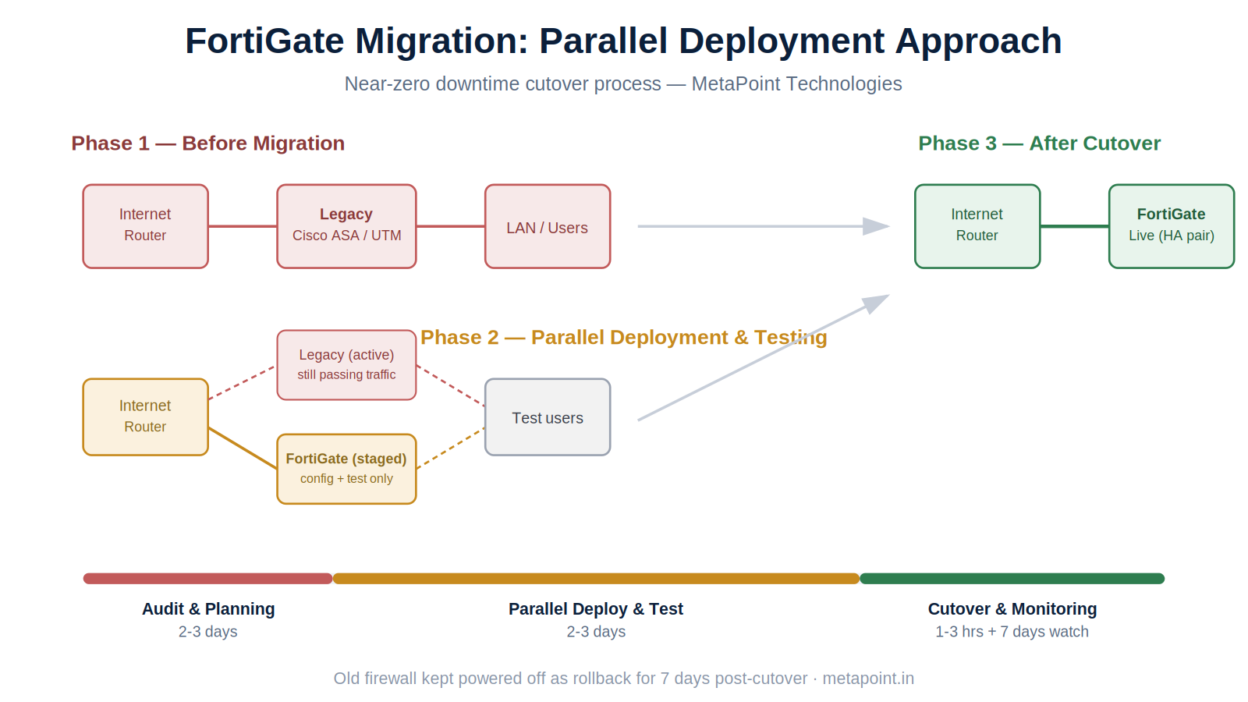
Show Image Three-phase migration: before, parallel deployment, and post-cutover
Step 1: Sizing and Model Selection
Confirm the FortiGate model matches current and near-future throughput, user count, and required security services (see our FortiGate buying guide for sizing logic).
Step 2: Parallel Deployment
Rack and configure the new FortiGate alongside the existing firewall — not as a replacement yet. This allows full configuration and testing without any live traffic risk.
Step 3: Policy Migration
Recreate (not just copy) firewall policies, NAT rules, and VPN tunnels on FortiGate. This is also the right moment to clean up years of rule sprawl — most legacy firewalls accumulate unused or conflicting rules that shouldn’t simply be ported over.
Step 4: VPN Re-establishment
Reconfigure site-to-site VPNs with FortiGate as the new endpoint. For third-party VPN peers (vendors, partners), coordinate the cutover window in advance since it requires changes on both ends.
Step 5: Staged Testing
Test connectivity, application access, and VPN tunnels using a subset of test users before the full cutover. Validate SSL inspection doesn’t break business-critical applications (a common issue with legacy apps and certain SaaS platforms).
Step 6: Cutover Window
Schedule the cutover during off-peak hours (typically a weekend night for most Hyderabad businesses). The actual cutover — swapping the FortiGate into the live network path — usually takes 1-3 hours including validation.
Step 7: Post-Cutover Monitoring
Monitor logs, throughput, and user-reported issues closely for the first 48-72 hours. Keep the old firewall powered off but connected as a rollback option for at least one week.
Step 8: Decommission Legacy Hardware
Once stability is confirmed, decommission the old firewall and update documentation, network diagrams, and disaster recovery runbooks.
Migration Timeline (Typical Single-Site)
| Phase | Duration |
|---|---|
| Audit and planning | 2-3 days |
| Parallel deployment and configuration | 1-2 days |
| Testing and validation | 1 day |
| Cutover window | 1-3 hours |
| Post-cutover monitoring | 3-7 days |
Multi-branch migrations are phased site-by-site, typically 1-2 sites per week depending on complexity and change-window availability.
Common Migration Pitfalls
- Copying old rules blindly. Legacy rule bases often contain unused or overly permissive rules — porting them over just moves the risk to new hardware.
- Underestimating VPN coordination. Third-party VPN peers need advance notice; last-minute coordination is the most common cause of migration delays.
- Skipping the parallel run. Attempting a direct swap without parallel testing significantly increases the risk of extended downtime.
- Not validating SSL inspection early. Some legacy or poorly-configured applications break under deep SSL inspection — catch this in testing, not production.
How MetaPoint Handles FortiGate Migrations
We’ve managed firewall migrations for businesses across Hyderabad, Telangana, and Andhra Pradesh — from single-site UTM replacements to multi-branch Cisco ASA-to-FortiGate rollouts. Our migration engagements include:
- Full pre-migration audit and rule-base cleanup
- Parallel deployment and staged testing
- Coordinated VPN cutover with third-party vendors
- Scheduled low-downtime cutover windows
- 7-day post-migration monitoring and rollback support
Frequently Asked Questions
Can we migrate from Cisco ASA to FortiGate without downtime? Near-zero downtime is achievable with a parallel deployment approach — the cutover window itself is typically 1-3 hours during off-peak hours, not a full outage.
Will our existing VPN tunnels need to be rebuilt? Yes, VPN tunnels need to be reconfigured with FortiGate as the new endpoint. We coordinate this with your third-party VPN peers in advance to minimize disruption.
How much does a FortiGate migration cost? Cost depends on firewall model, number of sites, and rule-base complexity. We provide a fixed-scope quote after the initial audit.
What happens to our old firewall? We recommend keeping it powered off as a rollback option for at least a week post-cutover, then decommissioning it once stability is confirmed.
Planning a firewall migration? Contact MetaPoint Technologies for a free migration assessment and timeline.