
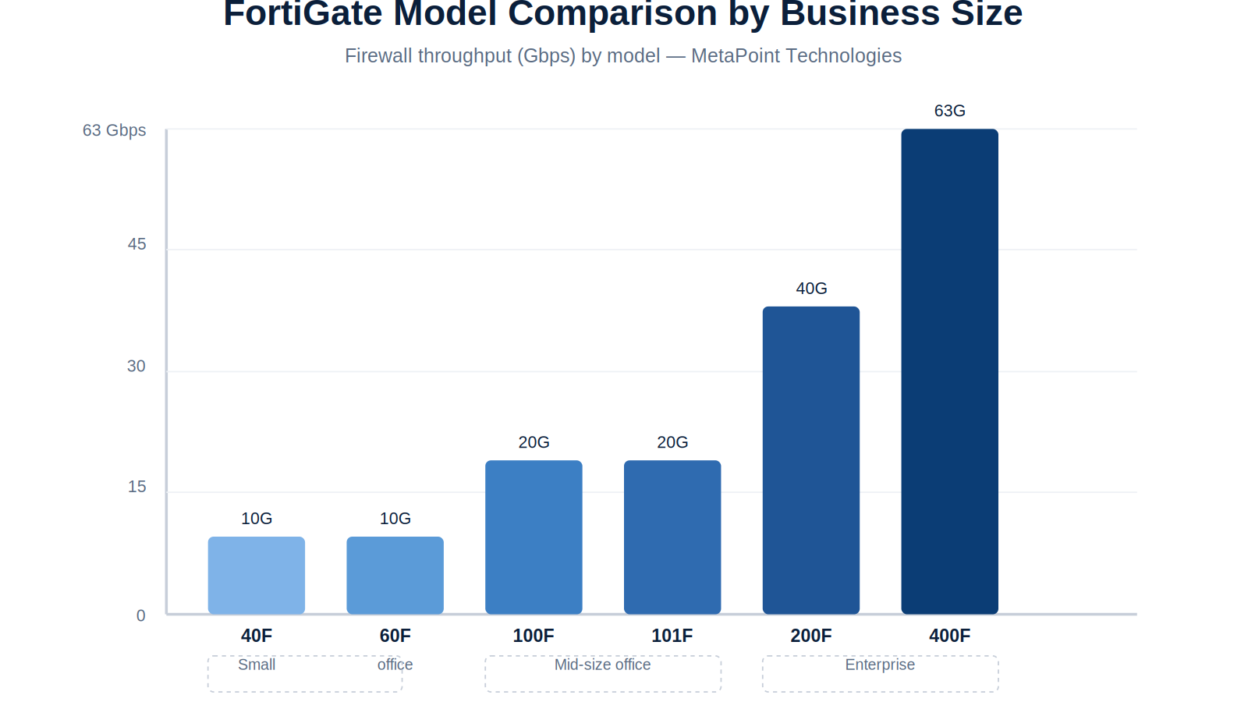
For businesses in Hyderabad and across Telangana with 1-25 employees, the FortiGate 40F or 60F covers most needs. Mid-size offices (25-100 users) should look at the FortiGate 100F or 101F. Enterprises with 100-500 users or multiple branch locations typically need the FortiGate 200F or higher, paired with FortiManager for centralized control. Read on for exact sizing logic, pricing bands, and what actually matters when choosing a model.
Why FortiGate Model Selection Matters More Than the Price Tag
A firewall that’s undersized throttles your internet during peak hours and blocks SSL inspection when you need it most. An oversized firewall wastes budget on throughput and session capacity you’ll never use. Getting this right the first time avoids a forced upgrade 18 months later — a mistake we see often with businesses in Hyderabad’s IT corridors who bought based on price alone.
The three numbers that actually determine your FortiGate model:
- Concurrent users — not total employees, but simultaneous active connections
- Required throughput — your ISP bandwidth plus headroom for growth (aim for 30-40% overhead)
- Security services enabled — IPS, SSL inspection, and application control each consume processing power differently than raw firewall throughput
FortiGate Model Comparison by Business Size
Small Office (1-25 users): FortiGate 40F / 60F
| Spec | FortiGate 40F | FortiGate 60F |
|---|---|---|
| Firewall throughput | 10 Gbps | 10 Gbps |
| IPS throughput | 1 Gbps | 1.2 Gbps |
| Threat protection throughput | 400 Mbps | 700 Mbps |
| Recommended users | Up to 15 | Up to 25 |
| Typical use case | Branch office, retail outlet | Small HQ, professional services firm |
The 60F is the more popular choice for small businesses in Hyderabad because it handles SSL inspection (mandatory for modern threat protection) without significant slowdown, whereas the 40F is better suited to branch/retail deployments with lighter security needs.
Mid-Size Office (25-100 users): FortiGate 100F / 101F
| Spec | FortiGate 100F | FortiGate 101F |
|---|---|---|
| Firewall throughput | 20 Gbps | 20 Gbps |
| IPS throughput | 3 Gbps | 3.5 Gbps |
| Threat protection throughput | 1 Gbps | 1.2 Gbps |
| SD-WAN support | Yes | Yes (enhanced) |
| Typical use case | Mid-size corporate office, manufacturing plant HQ | Multi-department office with SD-WAN needs |
This is the sweet spot for most mid-market businesses across Telangana and Andhra Pradesh — IT services firms, manufacturing units, and healthcare providers with a single large office.
Enterprise (100-500+ users): FortiGate 200F and above
| Spec | FortiGate 200F | FortiGate 400F |
|---|---|---|
| Firewall throughput | 40 Gbps | 63 Gbps |
| IPS throughput | 7 Gbps | 12 Gbps |
| Threat protection throughput | 2.5 Gbps | 4.6 Gbps |
| High Availability | Active/Passive & Active/Active | Active/Passive & Active/Active |
| Typical use case | Enterprise HQ, data center edge | Large enterprise, multi-branch hub |
At this scale, pair your FortiGate with FortiManager for centralized policy management and FortiAnalyzer for log correlation across sites — critical if you’re running multiple branches across Hyderabad, Bengaluru, and Chennai.
Common Sizing Mistakes We See in South India Deployments
- Ignoring SSL inspection overhead. Enabling deep SSL inspection can cut effective throughput by 40-60%. Size for this from day one, not after deployment.
- Buying for today’s headcount only. If you’re planning to scale from 30 to 60 employees in 18 months, size for the 60-person mark now.
- Skipping HA for “small” offices. Even a 20-person office loses real productivity during firewall downtime. A two-unit Active/Passive HA pair costs less than most businesses assume.
- Underestimating branch office needs. A retail chain with 10 outlets often needs FortiGate 40F units at each branch plus centralized FortiManager — not one large box at HQ.
FortiGate vs Generic UTM: Why It Matters for Compliance
If your business handles financial data, healthcare records, or works with government/BFSI clients in Telangana or Andhra Pradesh, FortiGate’s NGFW capabilities (application-layer inspection, integrated IPS, SD-WAN) typically satisfy compliance requirements that basic UTM appliances don’t. This matters increasingly for RBI-regulated financial entities and healthcare providers under evolving data protection norms.
How MetaPoint Helps You Size and Deploy FortiGate
As a Fortinet partner based in Hyderabad, MetaPoint runs a structured sizing assessment before recommending any model — reviewing your current bandwidth usage, user count, growth plans, and compliance requirements. We handle:
- FortiGate model selection and BOQ preparation
- Licensing (UTM bundle vs Enterprise bundle) guidance
- HA architecture design (Active/Passive across sites)
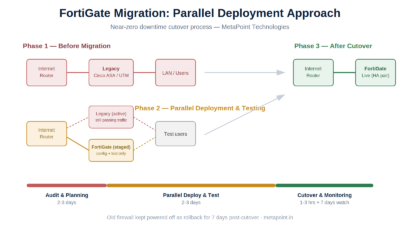
- Migration from existing firewalls (Cisco ASA, SonicWall, pfSense) with zero-downtime cutover planning
- Post-deployment support and AMC
Frequently Asked Questions
Which FortiGate model is best for a 50-person office in Hyderabad? The FortiGate 100F is typically right-sized for 50 users with room to grow to 75-80 before requiring an upgrade.
Is FortiGate more expensive than Sophos or SonicWall? FortiGate’s hardware pricing is competitive; the difference is usually in licensing bundles. We provide a like-for-like cost comparison during your assessment.
Can I deploy FortiGate across multiple branch offices in Telangana and Andhra Pradesh? Yes — FortiGate with FortiManager is designed for exactly this. Most of our multi-branch clients run smaller FortiGate units (40F/60F) at branches with centralized policy push from a single FortiManager console.
How long does a FortiGate deployment typically take? For a single-site deployment, 3-5 business days including migration from your existing firewall. Multi-branch rollouts are phased over 2-6 weeks depending on site count.
Need help sizing a FortiGate firewall for your business? Contact MetaPoint Technologies for a free network assessment.