
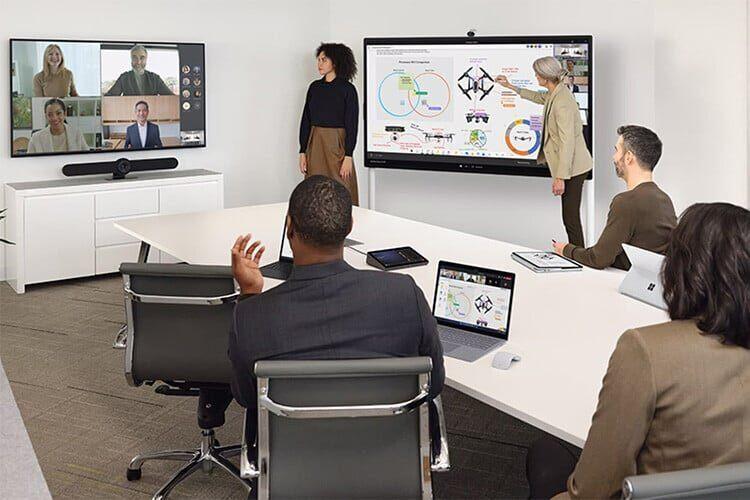
The right video conferencing setup depends almost entirely on room size and how many people use it. Huddle rooms (1–4 people) need an all-in-one bar; small rooms (4–6) need a bar with a wider field of view; medium rooms (6–12) benefit from a modular camera, separate audio, and a touch controller; and large boardrooms (12+) need multi-camera or ceiling-mic systems with proper acoustic planning. Match the hardware to the room — not the other way round — and standardise on one platform (Microsoft Teams, Zoom, or Google Meet) for a consistent experience.
Hybrid meetings are now permanent, and nothing frustrates a team faster than a room where remote participants can’t be seen or heard. This guide matches the right equipment to each room type.
Why room size drives every decision
A camera and mic built for a four-person huddle room will leave people at the far end of a boardroom looking distant and sounding muffled. Conversely, an expensive multi-camera boardroom system is overkill — and overspend — for a small room.
The professional approach is simple: classify each room by size and seating, then match a solution rated for that space. Audio matters even more than video — people forgive a slightly soft image, but they leave a meeting they can’t hear.
The buyer’s guide by room size
Huddle rooms (1–4 people)
Small, informal spaces for quick calls. The ideal solution is a single all-in-one video bar that combines camera, microphone, and speaker in one device — simple to install and use. Options like the Poly Studio R30 or compact Logitech and Neat bars deliver crisp video and clear audio without clutter. (We cover small-room options in depth in our guide on small room video conferencing.)
Small meeting rooms (4–6 people)
A step up in coverage. You still want an all-in-one bar, but one with a wider field of view and auto-framing that keeps everyone in shot as people join or move. Speaker tracking — which focuses on whoever is talking — makes remote participants feel included rather than like spectators.
Medium conference rooms (6–12 people)
Here a single bar may not cover the room well. Medium rooms benefit from a modular setup: a higher-capability camera with auto-framing, separate or expansion microphones for full-table audio pickup, and a dedicated touch controller for one-tap meeting start. Solutions like the Poly Studio X52 are designed for exactly this space. For Microsoft-centric organisations, Microsoft Teams Rooms-certified hardware delivers a native, consistent experience.
Large boardrooms and training rooms (12+ people)
Big rooms need real AV planning. That can mean multiple cameras (or an intelligent camera that switches to the active speaker), ceiling or expansion microphones for even coverage, and careful attention to acoustics and displays. A conference phone like the Poly Trio can anchor audio, while interactive displays from MAXHUB or large professional displays from BenQ, ViewSonic, or LG support presentations and whiteboarding. At this size, a proper site assessment isn’t optional.
Don’t overlook these four details
- Audio first. Invest in good microphones and speakers before fancy cameras. Poor audio ends meetings; soft video doesn’t.
- Standardise the platform. Pick Microsoft Teams, Zoom, or Google Meet and deploy certified hardware for it across rooms, so every room works the same way and staff don’t waste the first ten minutes fighting the tech.
- One-touch join. A touch controller that starts a meeting with a single tap removes the most common source of meeting-room frustration.
- Displays and acoustics. The right display size for the room, and basic acoustic treatment in larger spaces, make a bigger difference than most people expect.
Quick matching summary
- 1–4 people (huddle): all-in-one bar — e.g. Poly Studio R30
- 4–6 people (small): wide-FOV bar with auto-framing
- 6–12 people (medium): modular camera + expansion mics + touch controller — e.g. Poly Studio X52
- 12+ people (boardroom): multi-camera/ceiling-mic system + interactive or large display + acoustic planning
How MetaPoint sets up meeting rooms in Hyderabad
MetaPoint Technologies designs and installs video conferencing and collaboration solutions for businesses across Telangana, Andhra Pradesh, and Karnataka. As a certified partner for Poly, Logitech, Neat, DTEN, MAXHUB, BenQ, ViewSonic, and LG, we match the right equipment to every room — from huddle spaces to large boardrooms — and integrate it cleanly with your network and chosen platform.
Beyond the hardware, our IT infrastructure and network services make sure your video calls run on a network that can actually carry them — no dropped meetings, no buffering. With 15+ years and 100+ deployments, we deliver collaboration spaces that just work, the first time and every time.
Frequently asked questions
How do I choose video conferencing equipment for my meeting room? Start with room size and seating. Huddle and small rooms (1–6 people) need an all-in-one video bar; medium rooms (6–12) need a modular camera with expansion mics and a touch controller; large boardrooms (12+) need multi-camera or ceiling-mic systems with acoustic planning. Match the hardware to the room.
What’s more important — camera or audio? Audio. People will tolerate slightly soft video but will abandon a meeting they can’t hear clearly. Invest in quality microphones and speakers first.
Which platform should I standardise on — Teams, Zoom, or Google Meet? Whichever your organisation already uses most. The key is to pick one and deploy certified hardware for it across all rooms, so the experience is consistent and staff don’t struggle with different setups.
Do I need professional installation for video conferencing? For huddle and small rooms, a simple all-in-one bar is often plug-and-play. Medium and large rooms benefit from professional assessment and installation to handle camera placement, audio coverage, displays, and network integration.
Can MetaPoint equip multiple meeting rooms across offices? Yes. We design and install collaboration solutions for single rooms or organisation-wide rollouts across Hyderabad and South India, with on-site and remote support.
Planning meeting room upgrades? Get a free video conferencing assessment from MetaPoint — or call +91 99895 44438.